Get Affine from Image#
Latest demo params files / scripts: chiahao3/ptyrad
Documentation: https://ptyrad.readthedocs.io/en/latest/
PtyRAD paper: https://doi.org/10.1093/mam/ozaf070
PtyRAD arXiv: https://arxiv.org/abs/2505.07814
Zenodo record: https://doi.org/10.5281/zenodo.15273176
Box folder: https://cornell.box.com/s/n5balzf88jixescp9l15ojx7di4xn1uo
Youtube channel: https://www.youtube.com/@ptyrad_official
Note: This notebook is designed to demonstrate how to estimate affine transformations from image given prior information of the underlying structure
Authors:
Dr. Guanxing Li (initiated the idea), guanxing.li@cornell.edu
Dr. Chia-Hao Lee (refine the notebook), chia-hao.lee@cornell.edu
00. Imports#
import os
work_dir = "H:/workspace/ptyrad"
os.chdir(work_dir)
print("Current working dir: ", os.getcwd())
Current working dir: H:\workspace\ptyrad
import numpy as np
import matplotlib.pyplot as plt
import PyQt5 # This is needed for interactive point selection with matplotlib (i.e., pip install PyQt5)
from tifffile import imread
from skimage.transform import AffineTransform, warp
01. Define functions#
## Define PtyRAD functions here so you can run this without the PtyRAD python environment

def compose_affine_matrix(scale, asymmetry, rotation, shear):
    # Adapted from PtychoShelves +math/compose_affine_matrix.m
    # The input rotation and shear is in unit of degree
    rotation_rad = np.radians(rotation)
    shear_rad = np.radians(shear)

    A1 = np.array([[scale, 0], [0, scale]])
    A2 = np.array([[1 + asymmetry/2, 0], [0, 1 - asymmetry/2]])
    A3 = np.array([[np.cos(rotation_rad), np.sin(rotation_rad)], [-np.sin(rotation_rad), np.cos(rotation_rad)]])
    A4 = np.array([[1, 0], [np.tan(shear_rad), 1]])

    affine_mat = A1 @ A2 @ A3 @ A4

    return affine_mat

def decompose_affine_matrix(input_affine_mat):
    from scipy.optimize import least_squares
    def err_fun(x):
        scale, asymmetry, rotation, shear = x
        fit_affine_mat = compose_affine_matrix(scale, asymmetry, rotation, shear)
        return (input_affine_mat - fit_affine_mat).ravel()

    # Initial guess
    initial_guess = np.array([1, 0, 0, 0])
    result = least_squares(err_fun, initial_guess)
    scale, asymmetry, rotation, shear = result.x

    return scale, asymmetry, rotation, shear

def plot_affine_transformation(scale, asymmetry, rotation, shear):
    # Example
    # plot_affine_transformation(2,0,45,0)
    A = np.eye(2)
    Af = compose_affine_matrix(scale, asymmetry, rotation, shear)

    plt.figure()
    plt.title(f"Visualize affine transformation \n (scale, asym, rot, shear) = {scale, asymmetry, rotation, shear}", fontsize=14)

    # Add origin and scatter points
    plt.scatter(0, 0, color='gray', marker='o', s=3)
    plt.scatter(A[:,1], A[:,0], label='Original')
    plt.scatter(Af[:,1], Af[:,0], label='Transformed')

    # Adding arrows
    plt.quiver(A[0,1], A[0,0], angles='xy', scale_units='xy', scale=1, color='C0', alpha=0.5)
    plt.quiver(A[1,1], A[1,0], angles='xy', scale_units='xy', scale=1, color='C0', alpha=0.5)
    plt.quiver(Af[0,1], Af[0,0], angles='xy', scale_units='xy', scale=1, color='C1', alpha=0.5)
    plt.quiver(Af[1,1], Af[1,0], angles='xy', scale_units='xy', scale=1, color='C1', alpha=0.5)

    # Adding grid lines
    plt.grid(True, linestyle='--', color='gray', linewidth=0.5)

    plt.ylim(-2,2)
    plt.xlim(-2,2)
    plt.gca().set_aspect('equal', adjustable='box')
    plt.gca().invert_yaxis()  # Flipped y-axis if there's only scatter plot

    plt.xlabel('X')
    plt.ylabel('Y')

    plt.legend()
    plt.show()

def pick_points_with_keyboard(img, n=3, step=1.0):
    """
    Interactively pick n points on an image using mouse and keyboard.

    Args:
        img: Image array to display
        n: Number of points to pick (default: 3)
        step: Movement step size for arrow keys in pixels (default: 1.0)

    Returns:
        numpy array of shape (n, 2) containing [x, y] coordinates
    """
    pts = []  # Store confirmed points
    current = {"x": None, "y": None}  # Current point position (before confirmation)
    done = {"flag": False}  # Flag to track completion

    # Create figure and display image
    fig, ax = plt.subplots(figsize=(12, 12))
    fig_width_inches = fig.get_figwidth()
    base_fontsize = fig_width_inches * 2  # Adjust multiplier as needed

    ax.imshow(img, cmap="gray")
    ax.set_title(
        f"Pick {n} points\n"
        "Mouse click: place point | Arrow keys: move | Enter: confirm\n"
        "Tip: click inside the figure FIRST so it receives keyboard focus."
    , fontsize=base_fontsize)

    # Red marker for current (unconfirmed) point
    marker, = ax.plot([], [], 'ro', markersize=6)

    def redraw():
        """Update the display of the current point marker."""
        if current["x"] is None:
            marker.set_data([], [])  # Hide marker if no current point
        else:
            marker.set_data([current["x"]], [current["y"]])
        fig.canvas.draw_idle()

    def on_click(event):
        """Handle mouse click events to place a new point."""
        if event.inaxes != ax:
            return
        # Set current point to clicked location
        current["x"], current["y"] = float(event.xdata), float(event.ydata)
        redraw()

    def on_key(event):
        """Handle keyboard events for point movement and confirmation."""
        if event.key is None:
            return

        # Enter key: confirm current point
        if event.key == "enter":
            if current["x"] is None:
                return  # Allow Enter even when no point exists (no error)

            # Save the confirmed point
            pts.append([current["x"], current["y"]])
            print(f"Point {len(pts)-1} (x,y) confirmed: ({current['x']:.2f}, {current['y']:.2f})")

            # Draw confirmed point as green circle
            ax.plot(current["x"], current["y"], 'go', markersize=6)

            # Clear current point after confirmation
            current["x"], current["y"] = None, None
            redraw()

            # Close figure when all points are collected
            if len(pts) >= n:
                done["flag"] = True
                plt.close(fig)
            return

        # Don't allow movement if no current point exists
        if current["x"] is None:
            return

        # Determine step size: Shift key multiplies step by 10
        s = step
        if "shift" in (event.key or ""):
            s = step * 10

        # Arrow keys: move current point
        if event.key in ("left", "shift+left"):
            current["x"] -= s
        elif event.key in ("right", "shift+right"):
            current["x"] += s
        elif event.key in ("up", "shift+up"):
            current["y"] -= s  # Note: imshow y-axis points downward
        elif event.key in ("down", "shift+down"):
            current["y"] += s

        redraw()

    # Connect event handlers
    cid_click = fig.canvas.mpl_connect("button_press_event", on_click)
    cid_key = fig.canvas.mpl_connect("key_press_event", on_key)

    # Add axis labels
    ax.set_xlabel('X-axis', fontsize=base_fontsize)
    ax.set_ylabel('Y-axis', fontsize=base_fontsize)

    # Show plot and block until window is closed
    plt.show(block=True)

    # Disconnect event handlers
    fig.canvas.mpl_disconnect(cid_click)
    fig.canvas.mpl_disconnect(cid_key)

    # Convert points list to numpy array
    pts = np.array(pts, dtype=np.float64)

    # Validate that enough points were collected
    if pts.shape[0] < n:
        raise ValueError(f"Only got {pts.shape[0]} points. "
                f"Click inside the figure, then use Enter to confirm each point.")

    return pts

def get_affine_transformation_from_points(P0, P1, P2, target_angle=90.0, target_ratio=1.0, v1p_length=None, pixel_size=None):
    '''
    Calculate affine transformation from given points following user-defined constraints (angle, ratio, and length)

    # ========================================
    # User-specified geometric constraints
    # ========================================
    target_angle = 90.0      # Angle from v1 to v2 in degrees (clockwise rotation in image coords), default: 90
    target_ratio = 1.0       # |v2p|/|v1p| ratio, default: 1.0
    v1p_length = None        # Target length for v1p in real units (e.g., nm), default: None
    pixel_size = None        # Real-world size per pixel, default: None
    '''

    # ========================================
    # Input points and vectors
    # ========================================
    # P0, P1, P2 are already defined as (x, y) coordinates
    # Compute vectors from P0
    v1 = P1 - P0 # Roughly along with fast scan direction (horizontal)
    v2 = P2 - P0

    # ========================================
    # Sanity checks on input vectors
    # ========================================
    L1 = np.linalg.norm(v1)
    L2 = np.linalg.norm(v2)

    if L1 < 1e-9:
        raise ValueError("v1 is too small; P0 and P1 are nearly identical.")

    if L2 < 1e-9:
        raise ValueError("v2 is too small; P0 and P2 are nearly identical.")

    # Check if v1 and v2 are too collinear
    # Normalize the cross product by the product of magnitudes
    cross_product = v1[0] * v2[1] - v1[1] * v2[0]
    normalized_cross = abs(cross_product) / (L1 * L2)

    # normalized_cross = |sin(theta)| where theta is the angle between vectors
    # Values close to 0 mean vectors are nearly parallel
    if normalized_cross < 1e-3:  # ~0.06 degrees
        raise ValueError("v1 and v2 are nearly collinear; pick more independent vectors.")

    print("Original vectors:")
    print(f"  v1 = {v1}, |v1| = {L1:.3f}")
    print(f"  v2 = {v2}, |v2| = {L2:.3f}")
    print(f"  Original ratio |v2|/|v1| = {L2/L1:.3f}")

    # Calculate original angle (from v1 to v2)
    # In image coordinates: arctan2 gives us the angle directly
    angle_v1 = np.arctan2(v1[1], v1[0])
    angle_v2 = np.arctan2(v2[1], v2[0])
    # The rotation angle from v1 to v2 (can be positive or negative)
    original_angle = np.degrees(angle_v2 - angle_v1)
    # Normalize to [0, 360)
    if original_angle < 0:
        original_angle += 360

    print(f"  Original angle (v1→v2 rotation) = {original_angle:.2f}°")

    # ========================================
    # Construct target vectors v1p and v2p
    # ========================================
    # v1p: keep v1 unchanged (assume it's close to fast scan and fast scan is roughly correct)
    v1p = v1.copy()

    # v2p: construct based on angle and ratio constraints
    # Target length for v2p
    L1p = np.linalg.norm(v1p)
    L2p = target_ratio * L1p

    # Direction of v2p: rotate v1p by target_angle
    angle_rad = np.radians(target_angle)

    # Standard rotation matrix (counterclockwise in Cartesian, and clockwise in typical image coordinate due to inverted y-axis)
    cos_a = np.cos(angle_rad)
    sin_a = np.sin(angle_rad)
    rotation_matrix = np.array([[cos_a, -sin_a],
                                [sin_a, cos_a]])

    # Get unit direction for v2p
    v1p_unit = v1p / L1p
    v2p_direction = rotation_matrix @ v1p_unit
    v2p = L2p * v2p_direction

    print("\nTarget vectors (before optional scaling):")
    print(f"  v1p = {v1p}, |v1p| = {L1p:.3f}")
    print(f"  v2p = {v2p}, |v2p| = {L2p:.3f}")
    print(f"  Target ratio |v2p|/|v1p| = {L2p/L1p:.3f}")

    # Verify angle
    angle_v1p = np.arctan2(v1p[1], v1p[0])
    angle_v2p = np.arctan2(v2p[1], v2p[0])
    actual_angle = np.degrees(angle_v2p - angle_v1p)
    if actual_angle < 0:
        actual_angle += 360

    print(f"  Actual angle (v1p→v2p rotation) = {actual_angle:.2f}°")

    # ========================================
    # Compute affine transformation
    # ========================================
    # We want to find transformation A such that:
    #   A @ v1 = v1p  (keep v1 unchanged)
    #   A @ v2 = v2p  (correct v2)
    #
    # Build matrix equation: A @ [v1 v2] = [v1p v2p]
    # Therefore: A = [v1p v2p] @ [v1 v2]^(-1)

    B_source = np.column_stack([v1, v2])      # Source basis [v1, v2]
    B_target = np.column_stack([v1p, v2p])    # Target basis [v1p, v2p]

    # Check invertibility
    det_source = np.linalg.det(B_source)
    print(f"\ndet(B_source) = {det_source:.6f}")
    if abs(det_source) < 1e-8:
        raise ValueError("Source vectors are nearly collinear; cannot compute transformation.")

    # Compute transformation matrix
    A = B_target @ np.linalg.inv(B_source)

    print("\nTransformation matrix A (2x2):")
    print(A)

    # ========================================
    # Optional: Apply global scaling
    # ========================================
    scale_factor = 1.0  # Default: no scaling

    if v1p_length is not None and pixel_size is not None:
        # Calculate required scale factor
        current_length_in_units = L1p * pixel_size
        scale_factor = v1p_length / current_length_in_units

        # Apply scaling to transformation
        A = scale_factor * A

        print(f"\nApplying global scaling:")
        print(f"  Current |v1p| in real units = {current_length_in_units:.3f}")
        print(f"  Target |v1p| in real units = {v1p_length:.3f}")
        print(f"  Scale factor = {scale_factor:.6f}")
        print(f"\nScaled transformation matrix A (2x2):")
        print(A)

    # ========================================
    # Compute translation to keep P0 fixed
    # ========================================
    # We want: A @ P0 + t = P0
    # Therefore: t = P0 - A @ P0
    t = P0 - A @ P0

    print(f"\nTranslation vector t:")
    print(f"  t = {t}")

    # ========================================
    # Build 3x3 affine matrix for scikit-image
    # ========================================
    M = np.eye(3, dtype=np.float64)
    M[:2, :2] = A
    M[:2, 2] = t

    print("\nFinal 3x3 affine transformation matrix M:")
    print(M)

    # ========================================
    # Verification: Check transformed vectors
    # ========================================
    # Transform v1 and v2
    v1_transformed = A @ v1
    v2_transformed = A @ v2

    print("\n" + "="*50)
    print("VERIFICATION:")
    print("="*50)
    print(f"Original v1: {v1}")
    print(f"Transformed v1: {v1_transformed}")
    print(f"Expected v1p: {v1p * scale_factor}")
    print(f"  Error: {np.linalg.norm(v1_transformed - v1p * scale_factor):.6f}")

    print(f"\nOriginal v2: {v2}")
    print(f"Transformed v2: {v2_transformed}")
    print(f"Expected v2p: {v2p * scale_factor}")
    print(f"  Error: {np.linalg.norm(v2_transformed - v2p * scale_factor):.6f}")

    # Verify angle and ratio after transformation
    L1_trans = np.linalg.norm(v1_transformed)
    L2_trans = np.linalg.norm(v2_transformed)
    ratio_trans = L2_trans / L1_trans

    angle_v1_trans = np.arctan2(v1_transformed[1], v1_transformed[0])
    angle_v2_trans = np.arctan2(v2_transformed[1], v2_transformed[0])
    angle_trans = np.degrees(angle_v2_trans - angle_v1_trans)
    if angle_trans < 0:
        angle_trans += 360

    print(f"\nTransformed properties:")
    print(f"  |v1_transformed| = {L1_trans:.3f}")
    print(f"  |v2_transformed| = {L2_trans:.3f}")
    print(f"  Ratio |v2|/|v1| = {ratio_trans:.6f} (target: {target_ratio})")
    print(f"  Angle (v1→v2 rotation) = {angle_trans:.2f}° (target: {target_angle}°)")

    # Check that P0 is preserved
    P0_transformed = A @ P0 + t
    print(f"\nP0 preservation:")
    print(f"  Original P0: {P0}")
    print(f"  Transformed P0: {P0_transformed}")
    print(f"  Error: {np.linalg.norm(P0_transformed - P0):.6f}")

    return A, M

def visualize_affine_correction(img, corr, A, P0, P1, P2):
    """
    Visualize the original and corrected images with annotated vectors.

    Parameters
    ----------
    img : ndarray
        Original image
    corr : ndarray
        Corrected/warped image
    A : ndarray
        2x2 affine transformation matrix
    P0 : ndarray
        Origin point (x, y)
    P1 : ndarray
        First vector endpoint in original image (x, y)
    P2 : ndarray
        Second vector endpoint in original image (x, y)

    Returns
    -------
    fig, axes : matplotlib figure and axes objects
    """
    # Calculate transformed points
    P1p = A @ (P1 - P0) + P0
    P2p = A @ (P2 - P0) + P0

    # Calculate vectors
    v1_orig = P1 - P0
    v2_orig = P2 - P0
    v1p_corr = P1p - P0
    v2p_corr = P2p - P0

    # Calculate angles
    angle_orig = np.degrees(np.arctan2(v2_orig[1], v2_orig[0]) - np.arctan2(v1_orig[1], v1_orig[0]))
    if angle_orig < 0:
        angle_orig += 360

    angle_corr = np.degrees(np.arctan2(v2p_corr[1], v2p_corr[0]) - np.arctan2(v1p_corr[1], v1p_corr[0]))
    if angle_corr < 0:
        angle_corr += 360

    # Calculate lengths
    L1_orig = np.linalg.norm(v1_orig)
    L2_orig = np.linalg.norm(v2_orig)
    L1p_corr = np.linalg.norm(v1p_corr)
    L2p_corr = np.linalg.norm(v2p_corr)

    # Create figure
    fig, axes = plt.subplots(1, 2, figsize=(14, 6))

    # Arrow properties
    arrow_props = dict(arrowstyle='->', lw=2, mutation_scale=20)

    # ========================================
    # Left panel: Original image
    # ========================================
    axes[0].imshow(img, cmap="gray")
    axes[0].set_title("Original Image", fontsize=14, fontweight='bold')

    # Plot arrows
    axes[0].annotate('', xy=P1, xytext=P0, arrowprops={**arrow_props, 'color': 'red'})
    axes[0].annotate('', xy=P2, xytext=P0, arrowprops={**arrow_props, 'color': 'blue'})

    # Plot points
    axes[0].scatter(*P0, marker='o', c='yellow', s=80, edgecolors='black', linewidths=1.5, zorder=5)
    axes[0].scatter(*P1, marker='o', c='red', s=60, edgecolors='black', linewidths=1, zorder=5)
    axes[0].scatter(*P2, marker='o', c='blue', s=60, edgecolors='black', linewidths=1, zorder=5)

    # Add length labels at midpoint of arrows
    mid1 = P0 + v1_orig * 0.5
    mid2 = P0 + v2_orig * 0.5

    axes[0].text(mid1[0], mid1[1] - 8, f'v1: {L1_orig:.1f}px',
                 fontsize=10, color='red', fontweight='bold',
                 bbox=dict(boxstyle='round,pad=0.3', facecolor='white', edgecolor='red', alpha=0.8),
                 ha='center')

    axes[0].text(mid2[0] - 15, mid2[1], f'v2: {L2_orig:.1f}px',
                 fontsize=10, color='blue', fontweight='bold',
                 bbox=dict(boxstyle='round,pad=0.3', facecolor='white', edgecolor='blue', alpha=0.8),
                 ha='center')

    # Add angle annotation
    angle_pos = P0 + 25 * (v1_orig / L1_orig + v2_orig / L2_orig) / 2
    axes[0].text(angle_pos[0], angle_pos[1], f'{angle_orig:.1f}°',
                 fontsize=11, color='green', fontweight='bold',
                 bbox=dict(boxstyle='round,pad=0.4', facecolor='white', edgecolor='green', alpha=0.9),
                 ha='center')

    # Draw angle arc
    from matplotlib.patches import Arc
    angle1_orig = np.degrees(np.arctan2(v1_orig[1], v1_orig[0]))
    angle2_orig = np.degrees(np.arctan2(v2_orig[1], v2_orig[0]))
    arc_orig = Arc(P0, 50, 50, angle=0, theta1=angle1_orig, theta2=angle2_orig,
                   color='green', lw=2, linestyle='--')
    axes[0].add_patch(arc_orig)

    # ========================================
    # Right panel: Corrected image
    # ========================================
    axes[1].imshow(corr, cmap="gray")
    axes[1].set_title("Corrected Image", fontsize=14, fontweight='bold')

    # Plot arrows
    axes[1].annotate('', xy=P1p, xytext=P0, arrowprops={**arrow_props, 'color': 'red'})
    axes[1].annotate('', xy=P2p, xytext=P0, arrowprops={**arrow_props, 'color': 'blue'})

    # Plot points
    axes[1].scatter(*P0, marker='o', c='yellow', s=80, edgecolors='black', linewidths=1.5, zorder=5)
    axes[1].scatter(*P1p, marker='o', c='red', s=60, edgecolors='black', linewidths=1, zorder=5)
    axes[1].scatter(*P2p, marker='o', c='blue', s=60, edgecolors='black', linewidths=1, zorder=5)

    # Add length labels
    mid1p = P0 + v1p_corr * 0.5
    mid2p = P0 + v2p_corr * 0.5

    axes[1].text(mid1p[0], mid1p[1] - 8, f'v1p: {L1p_corr:.1f}px',
                 fontsize=10, color='red', fontweight='bold',
                 bbox=dict(boxstyle='round,pad=0.3', facecolor='white', edgecolor='red', alpha=0.8),
                 ha='center')

    axes[1].text(mid2p[0] + 15, mid2p[1], f'v2p: {L2p_corr:.1f}px',
                 fontsize=10, color='blue', fontweight='bold',
                 bbox=dict(boxstyle='round,pad=0.3', facecolor='white', edgecolor='blue', alpha=0.8),
                 ha='center')

    # Add angle annotation
    angle_pos_corr = P0 + 25 * (v1p_corr / L1p_corr + v2p_corr / L2p_corr) / 2
    axes[1].text(angle_pos_corr[0], angle_pos_corr[1], f'{angle_corr:.1f}°',
                 fontsize=11, color='green', fontweight='bold',
                 bbox=dict(boxstyle='round,pad=0.4', facecolor='white', edgecolor='green', alpha=0.9),
                 ha='center')

    # Draw angle arc
    angle1_corr = np.degrees(np.arctan2(v1p_corr[1], v1p_corr[0]))
    angle2_corr = np.degrees(np.arctan2(v2p_corr[1], v2p_corr[0]))
    arc_corr = Arc(P0, 50, 50, angle=0, theta1=angle1_corr, theta2=angle2_corr,
                   color='green', lw=2, linestyle='--')
    axes[1].add_patch(arc_corr)

    # Turn off axes
    for ax in axes:
        ax.axis("off")

    plt.tight_layout()

    return fig, axes
02. Load image and pick control points (mouse and keyboard)#
Note: P0 is the origin, P1 should go roughly horizontal right (along fast scan direction), and P2 should go roughly vertical down (along slow scan direction)
# Switch matplotlib to interactive mode, need PyQt5
%matplotlib qt

# Load tif image (this can be 2D image, 3D depth stack, or virtual BF generated from 4D-STEM)
file_path ='H:/workspace/ptyrad_work/output/simu_STO/20260116_static_aff_1_0_2_2_full_N5184_dp128_flipT001_random32_p2_1obj_25slice_dz10_plr1e-4_oalr5e-4_oplr5e-4_slr5e-4_orblur0.4_ozblur1.0_ozrec_oathr0.96_oposc_sng1.0_spr0.1_dose1e8/objp_zstack_crop_08bit_iter0050.tif'
img_input = imread(file_path).astype(np.float32)
print("Input image shape (Z,Y,X):", img_input.shape)

# Create a 2D image for point selection
if img_input.ndim == 3:
    img = img_input.sum(axis=0)
elif img_input.ndim == 2:
    img = img_input

# Interactively picking 3 points, note that a window will pop up!
pts = pick_points_with_keyboard(img, n=3, step=1.0)
P0, P1, P2 = pts
for label, p in zip(['P0', 'P1', 'P2'], [P0, P1, P2]):
    print(f"{label} (x,y): {p}")
Input image shape (Z,Y,X): (25, 295, 295)
Point 0 (x,y) confirmed: (138.79, 142.66)
Point 1 (x,y) confirmed: (217.13, 142.66)
Point 2 (x,y) confirmed: (135.81, 221.00)
P0 (x,y): [138.79301711 142.65962518]
P1 (x,y): [217.13239925 142.65962518]
P2 (x,y): [135.80865969 220.99900732]
03. Calculate transformation from points#
# Switch matplotlib back to inline mode
%matplotlib inline

target_angle = 90.0      # Angle from v1 to v2 in degrees (clockwise rotation in image coords), default: 90
target_ratio = 1.0       # |v2p|/|v1p| ratio, default: 1.0
v1p_length = None        # Target length for v1p in real units (e.g., Ang or nm), default: None
pixel_size = None        # Physical size per pixel, default: None

# Get affine transformation matrix (A: 2x2 affine, M:3x3 affine with translation)
A, M = get_affine_transformation_from_points(P0, P1, P2, target_angle=target_angle, target_ratio=target_ratio, v1p_length=v1p_length, pixel_size=pixel_size)
Original vectors:
  v1 = [78.33938214  0.        ], |v1| = 78.339
  v2 = [-2.98435741 78.33938214], |v2| = 78.396
  Original ratio |v2|/|v1| = 1.001
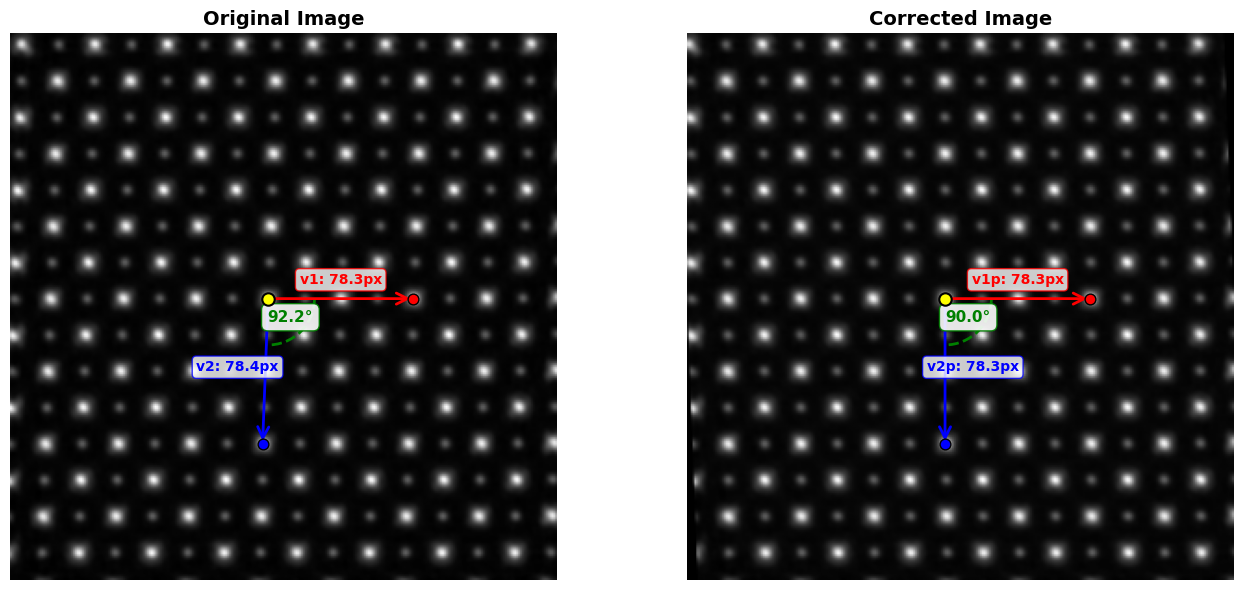
  Original angle (v1→v2 rotation) = 92.18°

Target vectors (before optional scaling):
  v1p = [78.33938214  0.        ], |v1p| = 78.339
  v2p = [4.79690368e-15 7.83393821e+01], |v2p| = 78.339
  Target ratio |v2p|/|v1p| = 1.000
  Actual angle (v1p→v2p rotation) = 90.00°

det(B_source) = 6137.058794

Transformation matrix A (2x2):
[[1.         0.03809524]
 [0.         1.        ]]

Translation vector t:
  t = [-5.43465239e+00 -2.84217094e-14]

Final 3x3 affine transformation matrix M:
[[ 1.00000000e+00  3.80952381e-02 -5.43465239e+00]
 [ 0.00000000e+00  1.00000000e+00 -2.84217094e-14]
 [ 0.00000000e+00  0.00000000e+00  1.00000000e+00]]

==================================================
VERIFICATION:
==================================================
Original v1: [78.33938214  0.        ]
Transformed v1: [78.33938214  0.        ]
Expected v1p: [78.33938214  0.        ]
  Error: 0.000000

Original v2: [-2.98435741 78.33938214]
Transformed v2: [4.88498131e-15 7.83393821e+01]
Expected v2p: [4.79690368e-15 7.83393821e+01]
  Error: 0.000000

Transformed properties:
  |v1_transformed| = 78.339
  |v2_transformed| = 78.339
  Ratio |v2|/|v1| = 1.000000 (target: 1.0)
  Angle (v1→v2 rotation) = 90.00° (target: 90.0°)

P0 preservation:
  Original P0: [138.79301711 142.65962518]
  Transformed P0: [138.79301711 142.65962518]
  Error: 0.000000
04. Verify transformation#
# Make the corrected image
tf = AffineTransform(matrix=M) # warp is using 'inverse_map', so we're passing the inverse of M
corr = warp(img, inverse_map=tf.inverse, preserve_range=True)

fig, axes = visualize_affine_correction(img, corr, A, P0, P1, P2)
plt.show()
05. Extract affine components for PtyRAD#
# Convert A from image convention to matrix convention for PtyRAD
S = np.array([[0,1],[1,0]]) # Use this S_xy matrix to swap x,y
Ap = S @ A.T @ S # A = [[a,b], [c,d]], Ap = [[d,b],[c,a]].

ptyrad_affs = np.round(decompose_affine_matrix(Ap), 5) # Round to 4 decimals
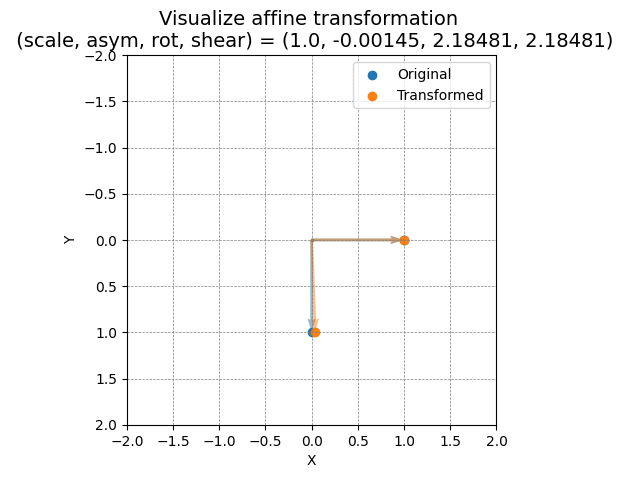
plot_affine_transformation(*tuple((v.item() for v in ptyrad_affs)))
print("Input the following affine transformation components to 'pos_scan_affine' in PtyRAD params file")
print(f'(scale, asymmetry, rotation, shear) = [{", ".join(f"{x:.4f}" for x in ptyrad_affs)}]') # Note that rotation and shear are in degrees
Input the following affine transformation components to 'pos_scan_affine' in PtyRAD params file
(scale, asymmetry, rotation, shear) = [1.0000, -0.0014, 2.1848, 2.1848]